
Radius CMS: Free Self-Hosted Laravel CMS with eCommerce
18 November 2026

Most websites end up stitched together: a CMS for content, a plugin for the shop, another for SEO, another for forms, a page builder on top, and a monthly bill for several of them. Every addition is one more thing to update, one more thing that can break, and one more script your visitors have to download.
Radius CMS takes a different approach. It is a modular, self-hosted CMS and eCommerce platform built on Laravel 12. Pages, a blog, a drag-and-drop visual builder, a full online store, eight payment methods and built-in SEO all come in one application that you install on your own hosting. It is open source under the MIT licence, so there is no per-seat fee, no revenue share and no account to keep paying for.
This guide covers what Radius CMS does, how its main features work, and who it suits best, so you can decide whether it fits your next website or online store.
Radius CMS at a glance
- Self-hosted and open source: MIT licensed, runs on PHP 8.2+ and MySQL, and works on ordinary shared hosting.
- 15 built-in modules: switch off what you don't need and it stops costing anything.
- Visual page builder: more than 40 drag-and-drop widgets, rendered on the server as plain HTML.
- Complete eCommerce: products, variants, stock, digital downloads, coupons, orders, invoices and refunds.
- 8 payment methods: Stripe, PayPal, Razorpay, PayU, Cashfree, Wise, cash on delivery and bank transfer, with no platform fee.
- SEO built in: meta tags, sitemap.xml, robots.txt, schema.org structured data and a redirect manager.
- Easy migration: import a WordPress or WooCommerce site, including posts, pages, products, menus and images.
What is Radius CMS?
Radius is a content management system and an online store in a single Laravel application. You upload the files, create an empty database and open your site. A four-step setup wizard checks your server, writes the configuration and creates your admin account. From there you can run a business website, a blog, an online shop or all three from one admin panel.
The key design decision is that Radius is one application, not a small core surrounded by a marketplace of plugins you need before it becomes useful. The essentials of running a website (content, commerce, payments, SEO, forms and security) ship in the box and are built to work together.
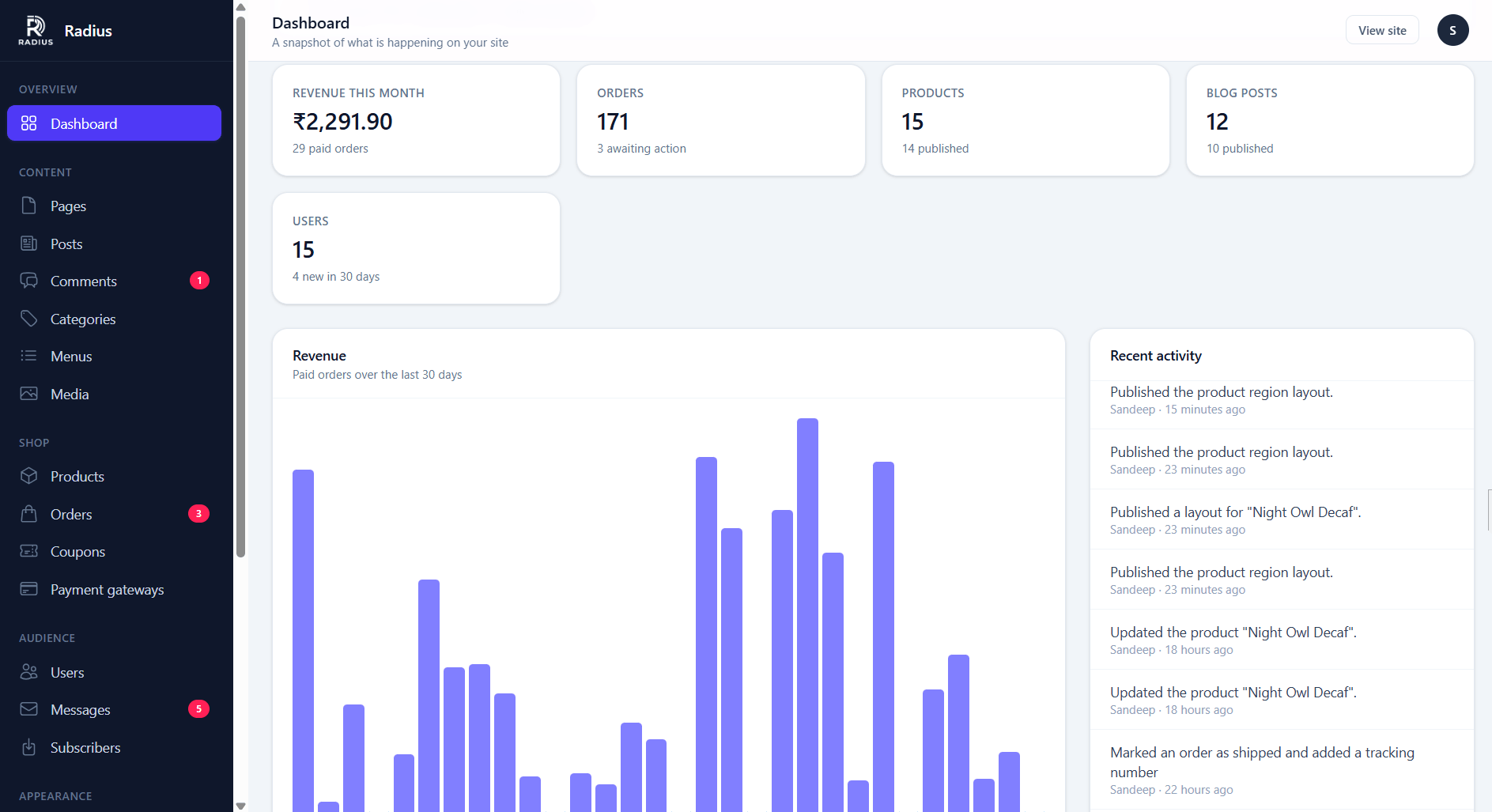
A modular CMS: only run what you use
Every optional feature in Radius is a module you can switch on or off under System → Modules. Fifteen modules ship with every release:
| Module | What it adds |
|---|---|
| Pages, Media, Themes, Users (core) | Static pages, uploads, themes, accounts, roles and two-factor authentication |
| Blog | Posts, categories, tags and comments |
| eCommerce | Products, cart, checkout, orders and coupons |
| Payments | Eight payment methods, refunds and webhooks |
| SEO | Meta tags, sitemap.xml, robots.txt, schema.org and redirects |
| SMS | Transactional SMS and OTP through MSG91 or Twilio |
| Firebase | Web push notifications |
| Contact forms | Front-end forms and a submission inbox |
| Newsletter | Subscriber capture and CSV export |
| Media storage & CDN | Serve uploads from Amazon S3, Cloudflare R2, DigitalOcean Spaces, Google Cloud, FTP or a CDN |
| Import & export | Portable content bundles and a WordPress importer |
| Mobile API | A secure JSON API for your own mobile app (ships switched off) |
Switching a module off doesn't just hide it. A disabled module registers no routes, runs no database queries, adds no menu items and removes its widgets from the builder, so a blog-only site carries none of the shop's weight. Nothing is deleted when you switch a module off, and turning it back on restores your products, orders or posts exactly as they were.
Need more than the built-in modules? Browse Radius modules and plugins to add extra features to your site.
A visual page builder that keeps your site fast
Radius includes a drag-and-drop visual page builder that is part of the CMS, not a separate plugin. You design pages from sections, columns and widgets, with a live canvas in the middle and settings for the selected element on the right.
The difference is where the page is put together. Many page builders send a bundle of JavaScript to every visitor and assemble the page in the browser. Radius renders on the server: your layout is compiled to plain HTML with a single stylesheet. Visitors don't need JavaScript to read a built page, which makes it fast to load, easy for search engines to index and readable on a slow mobile connection.
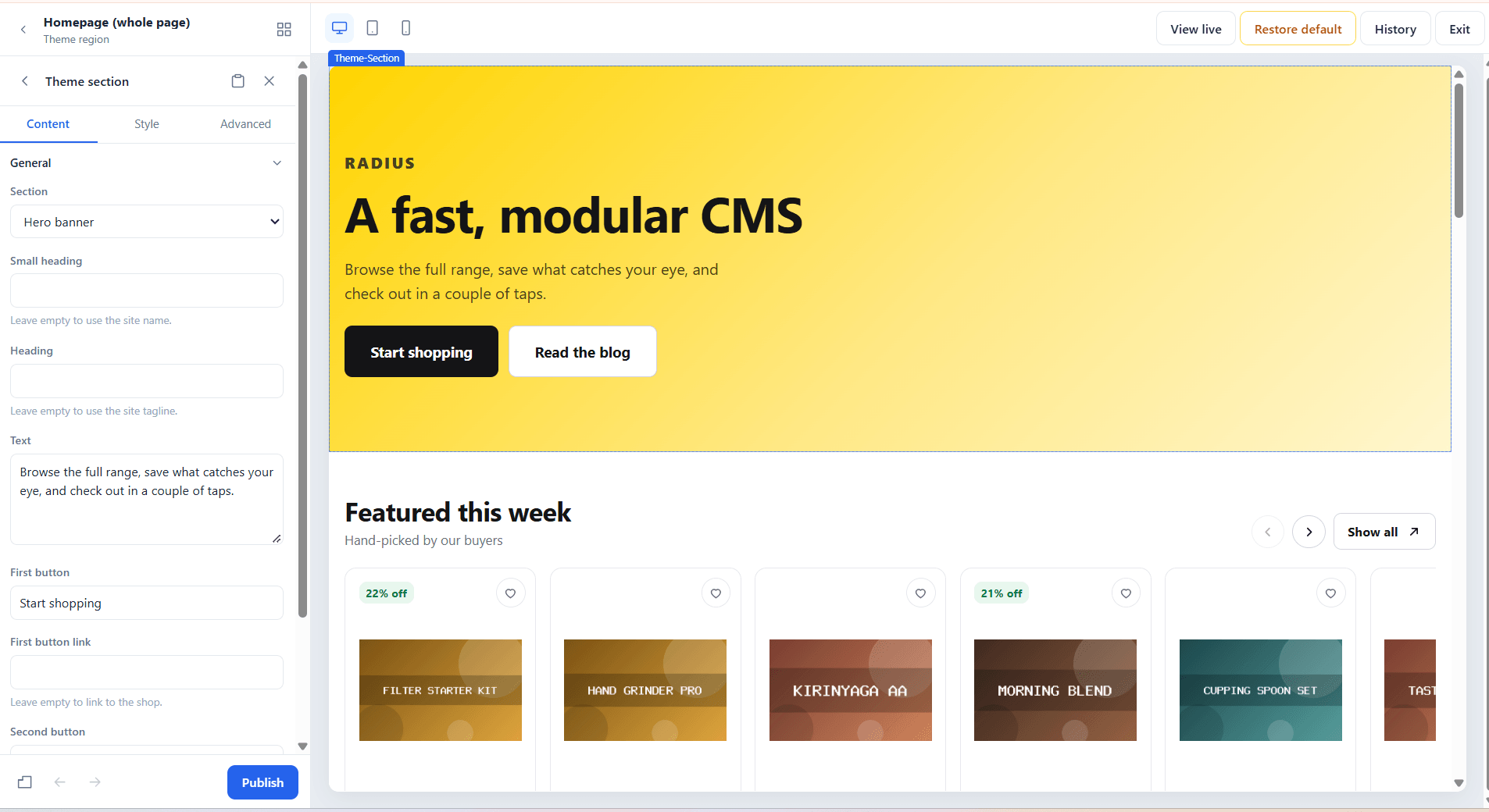
Page builder features
- More than 40 widgets across Basic, Media, Layout, Content, Shop, Product page and Site parts: headings, images, video, galleries, maps, icon boxes, post grids, accordions, tabs, testimonials, counters, pricing tables, contact forms, newsletter sign-ups, product grids and more.
- Responsive editing: switch between desktop, tablet and mobile and set separate values for each, or hide a widget on one screen size entirely.
- Design tokens: brand colours are stored as variables, so changing your primary colour once updates every section that uses it.
- Saved sections: build a hero banner or call to action once and drop it onto any page.
- Autosaved drafts and revision history: your work stays private until you press Publish, and any of the last 25 published versions can be restored.
- Instant style editing: colour, spacing and typography changes update the preview immediately, with no waiting on the server.
- Keyboard shortcuts for undo, redo, duplicate and publish.
Design headers, footers and product pages, not just content
Themes can hand regions such as the header, footer and homepage over to the builder, so you can redesign them visually. Each region opens with a ready-made starter layout from your theme, and the theme's original design is one click away if you ever need it back.
The builder also designs your product page template once for the whole shop. Dedicated widgets cover the image gallery, title, price and sale badge, star rating, Add to cart and Buy now buttons, stock status, trust badges, product details, reviews and related products.
eCommerce features: a complete online store, built in
The eCommerce module turns your site into a full online store without third-party plugins. It takes care of the parts of selling online that are easy to get wrong, from exact pricing to stock control.
Products, variants and inventory
- Physical and digital products with rich descriptions, image galleries, categories and per-product SEO settings.
- Product variants for options such as size and colour, each with its own price, SKU and stock level.
- Scheduled sale prices with optional start and end dates.
- Stock tracking with low-stock alerts, backorders and per-product thresholds.
- Customer reviews with moderation, and average star ratings on the product page.
Behind the scenes, prices are stored as whole numbers in the currency's smallest unit (cents or paise), so totals are always exact. Stock is reduced inside the same database transaction that creates the order, so two customers racing for your last item can't both buy it.
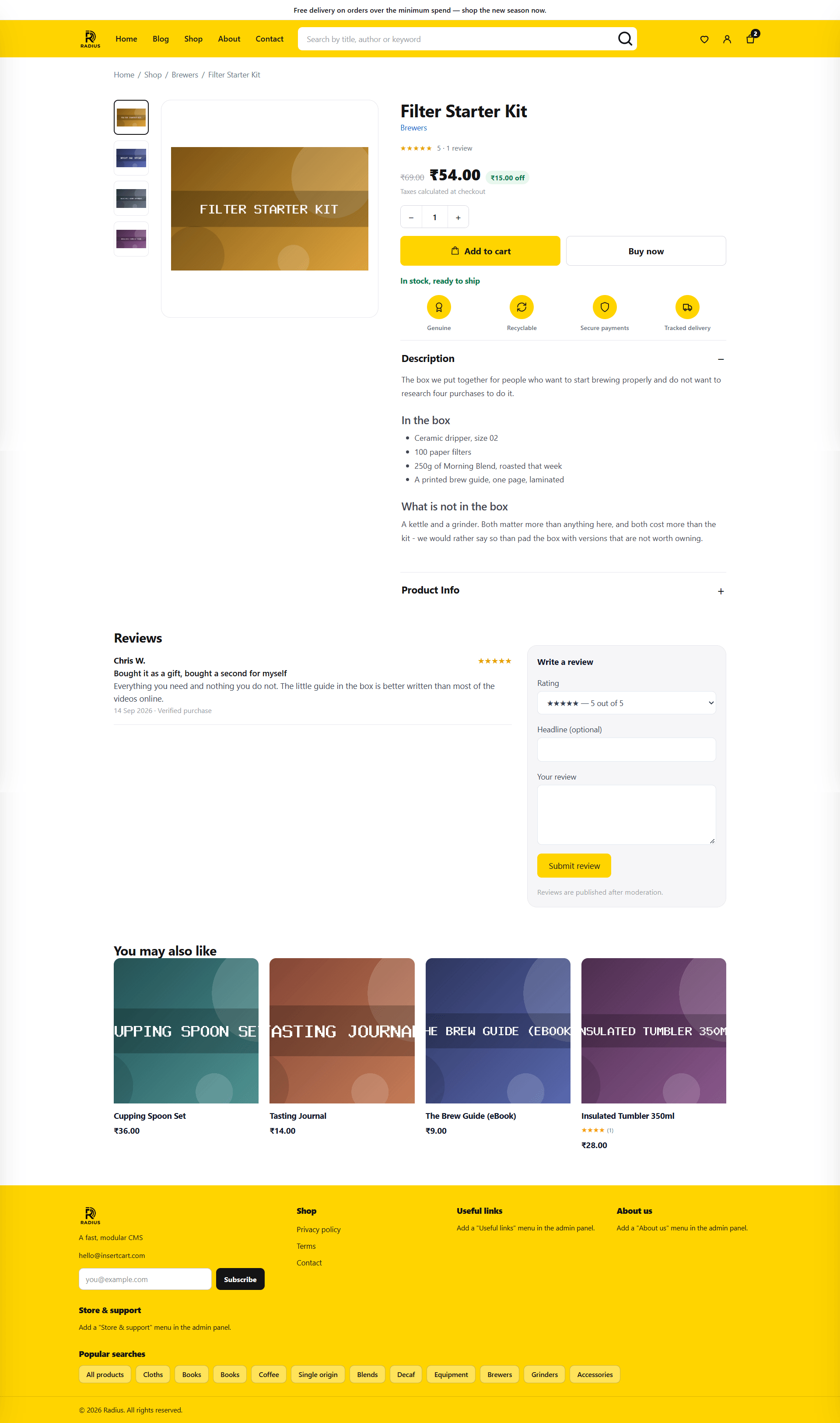
Sell digital products securely
Radius is built to sell ebooks, music, templates, courses, design assets and source code. Downloadable files are kept in private storage with no public URL. Customers download from their account only after the order is paid, within a download limit and an optional expiry period that you set. If you upload a new version of a file, earlier buyers keep the exact file they paid for.
Cart, checkout and customer accounts
- Guest checkout or required registration: your choice.
- Configurable checkout fields: make phone, address, postcode and other fields required, optional or hidden. Hide every address field for a downloads-only shop.
- Sell worldwide or only to the countries you choose, enforced on the server.
- Saved addresses: returning customers find checkout already filled in, and signed-in customers get an address book.
- Buy now buttons that take shoppers straight to checkout.
- Tax and shipping: a tax rate with tax-inclusive or tax-exclusive pricing, a flat shipping fee and free shipping above an amount you set.
Every total is recalculated on the server at checkout. The browser displays prices; it never gets to decide them.
Orders, invoices, coupons and refunds
- An order screen with line items, addresses, a full payment log and a timeline of every status change.
- Separate payment and fulfilment statuses, so "paid" and "shipped" are tracked independently.
- Printable invoices with your logo and business address.
- Coupons: percentage, fixed amount or free shipping, with minimum spend, usage limits, per-customer limits, date windows and product or category restrictions.
- Refunds from the admin panel for Stripe, PayPal, Razorpay, PayU and Cashfree, including partial refunds where the provider supports them.
- A Reconcile button that asks the payment provider for an order's true status when something looks stuck.
Payment gateways: 8 ways to get paid, zero platform fees
Radius connects to eight payment methods out of the box. You pay your payment processor's normal fees and nothing more: Radius takes no cut of your sales.
| Payment method | Checkout flow | Refunds from admin | Webhooks |
|---|---|---|---|
| Stripe | Hosted checkout | Yes | Yes |
| PayPal | Orders v2 redirect | Yes | Yes |
| Razorpay | Checkout modal | Yes | Yes |
| PayU | Signed form | Yes | No |
| Cashfree | Hosted checkout | Yes | Yes |
| Wise | Bank transfer with optional transfer matching | No | No |
| Cash on delivery | Offline | No | No |
| Bank transfer | Offline | No | No |
Payments are handled with care:
- A customer returning from a payment page is never taken as proof of payment. Every return is verified with the provider's API before an order is marked paid.
- Webhook signatures are verified, so orders are still confirmed if a customer closes the tab right after paying.
- Gateway credentials are encrypted at rest and never sent back to the browser.
- Every gateway has a test mode, and won't go live until all of its credentials are filled in.
With Razorpay, PayU, Cashfree, cash on delivery and MSG91 SMS built in, Radius is a strong fit for online stores in India, while Stripe, PayPal and Wise cover customers around the world.
Built-in SEO tools to help you rank
Radius treats search engine optimisation as a core feature, not an add-on:
- Per-page SEO: a custom meta title, description, social share image and noindex switch on every page, post and product, with site-wide defaults as a fallback.
- An automatic sitemap.xml and an editable robots.txt.
- Schema.org structured data: Organization, LocalBusiness or Store markup for your site, Article and BlogPosting for posts, Product markup with prices and review ratings for your shop, breadcrumbs, and FAQ markup from the builder's accordion widget.
- Open Graph and Twitter/X cards, so links look right when they're shared.
- A redirect manager that keeps your rankings and inbound links working when a URL changes.
- Google Analytics and Search Console verification fields.
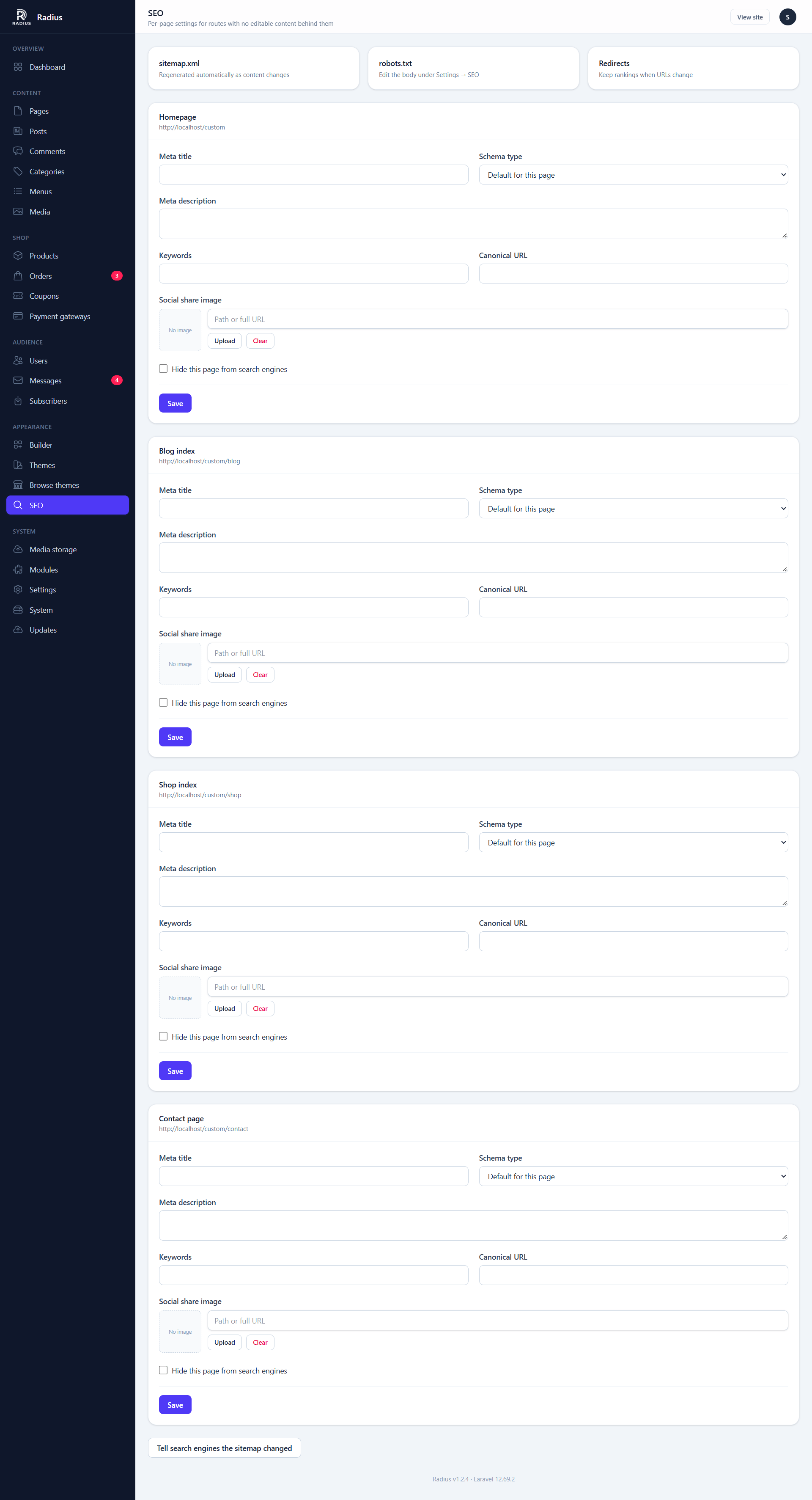
Page speed matters for rankings too. Server-rendered pages, optional full-page caching, automatic image thumbnails, alt-text reminders in the media library and optional CDN delivery through Cloudflare, BunnyCDN, CloudFront, Amazon S3, Cloudflare R2 and others all help your pages load quickly.
Visitors can find what they need with site search across posts, products and pages, with results that appear as they type. Large catalogues can switch to a prebuilt search index, so a busy search box never slows down your database.
Content management and blogging
- Pages with nesting, templates, scheduling and a one-click homepage switch.
- A blog with categories, tags, scheduled posts, excerpts and moderated comments.
- A rich text editor that cleans up content pasted from Word or Google Docs, and safely embeds YouTube, Vimeo, Google Maps, Spotify and SoundCloud.
- A media library with automatic thumbnails and one shared picker, so you never upload the same image twice.
- Navigation menus with nested items, and links that show only to signed-in or signed-out visitors.
- User roles for administrators, editors and customers, so your content team never touches settings or payment credentials.
Marketing tools to grow your audience
- Contact forms with up to 30 custom fields (dropdowns, dates, checkboxes and more), saved to an inbox so no enquiry is lost to a spam folder.
- Newsletter sign-ups with secure unsubscribe links and CSV export for Mailchimp, Brevo or any email platform.
- SMS and one-time passwords through MSG91 or Twilio.
- Web push notifications through Firebase.
- reCAPTCHA v3 spam protection for contact, newsletter and registration forms.
- Email delivery through SMTP, Resend, Amazon SES or Postmark.
Security built in, not bolted on
An online store holds customer data and takes payments, so Radius builds security into the core:
- Two-factor authentication with one-time recovery codes, which you can require for every administrator.
- Rate-limited logins, counted by email address and by IP address separately.
- Upload scanning: a file's contents must match its extension, hidden code is rejected, SVGs are cleaned and photos are re-encoded to strip GPS location data.
- Unguessable order numbers, so nobody can browse other customers' orders by editing a URL.
- An exposure check that tests whether sensitive files on your server can be reached from the web.
- A system health checklist and an activity log in the admin panel.
- Verified one-click updates: every release is checked over HTTPS against a SHA-256 checksum, a backup is taken first, and you can roll back in one click. Nothing ever installs without your say-so.
Switch from WordPress and WooCommerce without starting over
Moving to Radius doesn't mean rebuilding your content by hand. The built-in WordPress importer reads the standard export file from WordPress's Tools → Export screen and brings across:
- Posts and pages, with categories, tags, authors, dates and page nesting
- Comments, with their replies
- Menus, pointing at the imported pages and posts
- WooCommerce products and product categories, with SKU, price, sale price, stock and weight
- Images, downloaded from your old site into the Radius media library
Every import shows you what's inside the file before anything touches your site. WordPress plugins, widgets, theme settings and shortcodes don't carry over, because they only mean something inside WordPress.
The same import and export tools move a Radius site from staging to live, back up your content as a portable bundle, or export a product list as a spreadsheet. Links to the old address are updated to the new one automatically.
Themes, plugins and a mobile API for growth
- Themes: Radius ships with Default, for pages and a blog, and Storefront, a retail theme built for large catalogues. Free Radius themes install in one click from the built-in theme directory, and every theme is scanned for unsafe code before it's installed.
- Plugins: add features from the plugin directory or by uploading a ZIP, and see what's available on the Radius modules and plugins page. A safe mode gets you back in if a plugin misbehaves.
- Mobile API: a secure JSON API for your own iOS or Android app, covering content, the shop and customer accounts. Every app needs its own key and secret, and each group of endpoints is switched on individually.
- Developer friendly: themes are standard Laravel Blade templates, and a new builder widget is one PHP class and one Blade view.
- White-label ready: agencies can rebrand Radius with their own logo, product name and update feed.
Who is Radius CMS for?
Small businesses and service companies get a fast website with pages, a contact form and local business markup for search engines, without paying a monthly website-builder subscription.
Online stores get physical products with variants, stock control, coupons and a choice of payment gateways in one place.
Digital product sellers can deliver ebooks, music, courses, templates and code securely, with download limits and access that expires when you want it to.
Bloggers and publishers get scheduling, comments, SEO and newsletter capture on pages that load quickly.
Agencies and freelancers can use one platform for brochure sites, blogs and shops, white-label it for each client, and rely on an MIT licence that lets them use it on as many projects as they like.
Laravel developers get a production-ready CMS and online store on a framework they already know, with clean extension points for themes, widgets, plugins and payment gateways.
Businesses selling in India get Razorpay, PayU, Cashfree, cash on delivery and MSG91 SMS without hunting for extensions.
Brands with a mobile app can manage the website and the app's content, products and customers from one admin panel.
Radius CMS vs WordPress and WooCommerce
WordPress with WooCommerce is the most common way to build a content site with a shop. Here's how Radius compares:
| Radius CMS | WordPress + WooCommerce | |
|---|---|---|
| Online store | Built in; switch it on or off | Added with the WooCommerce plugin |
| Drag-and-drop page builder | Built in and rendered on the server | Block editor in core; most drag-and-drop builders are third-party plugins |
| Payment gateways | 8 included | Added through payment extensions |
| SEO: schema, redirects, meta | Built in | Basic sitemaps in core; schema and redirects usually come from SEO plugins |
| Framework | Laravel 12, PHP 8.2+ | WordPress core, PHP |
| Ecosystem | A growing directory of themes and plugins | Tens of thousands of plugins and themes |
| Licence | MIT | GPL |
If your site depends on a specific WordPress plugin, WordPress is still the right home for it. If you'd rather have content, commerce and SEO designed together in one modern Laravel application, Radius is worth a serious look.
A few things are worth knowing before you switch. Radius is self-hosted, so you look after your own hosting, backups and SSL certificate. WordPress plugins and themes don't run on it. And each installation serves one website, with no multisite mode.
How to get started with Radius CMS
Radius needs PHP 8.2 or newer, MySQL 5.7+ or MariaDB 10.3+ and the common PHP extensions most hosts already enable. It runs on shared hosting, cPanel, CloudPanel, Apache or nginx, and your server doesn't need Node.js.
- Download the latest Radius release and upload the files to your hosting.
- Create an empty MySQL database.
- Open your website in a browser. The setup wizard starts automatically.
- Follow the four steps: server check, database, site details and admin account.
Once you're in, turn on two-factor authentication, switch off the modules you don't need, set up email and connect a payment gateway if you're selling. The System screen shows a checklist of anything still to configure. The full walkthrough is in the Radius installation guide.
Frequently asked questions
Is Radius CMS open source?
Yes. Radius is released under the MIT licence. You can use it commercially, fork it, and build closed-source themes and plugins on top of it. There is no per-seat fee, no revenue share and no account to keep paying for.
Does Radius CMS charge transaction fees?
No. Radius takes no platform fee on your sales. You only pay the normal fees of the payment provider you choose, such as Stripe, PayPal or Razorpay.
What hosting do I need for Radius CMS?
Any host that runs PHP 8.2 or newer with MySQL 5.7+ or MariaDB 10.3+. Shared hosting works, and Node.js is not needed on the server. The setup wizard checks your server before installing.
Can I move my WordPress or WooCommerce site to Radius?
Yes. The built-in WordPress importer brings across posts, pages, categories, tags, comments, menus, images and WooCommerce products with their prices and stock. You see a preview of everything before it's imported.
Can I sell digital products with Radius CMS?
Yes. Digital files are stored privately with no public URL and can only be downloaded from a paid order, with download limits and optional expiry dates that you control.
Is Radius CMS good for SEO?
Yes. Pages are rendered on the server as plain HTML, and the SEO module adds per-page meta tags, sitemap.xml, robots.txt, schema.org structured data and redirects. Page caching and CDN support help pages load quickly.
Can agencies use Radius for client websites?
Yes. The MIT licence allows unlimited commercial use, and Radius can be white-labelled with your own logo, product name and update feed.
Can one Radius installation run several websites?
No. Each Radius installation serves one website. To run several sites, install Radius once for each.
Build your next website and online store on Radius
Radius CMS brings content management, a fast visual page builder, a complete eCommerce platform, eight payment methods and built-in SEO together in one self-hosted Laravel application that you own outright. Switch on what you need, switch off what you don't, and grow without stacking up plugins and subscriptions.